

Setup Checklist
Once your organisation is set up, run through these four steps. They only take a few minutes and prevent the most common early hiccups - especially double-sent invoices and duplicate reminders.
1. Complete the onboarding steps
Section titled “1. Complete the onboarding steps”Make sure you’ve finished organisation onboarding: organisation details, an accounting connection (or Sawfish invoicing), and your payout account.
2. Set up invoice email reminders
Section titled “2. Set up invoice email reminders”Go to Settings → Invoice Notifications and configure your email reminders so your customers never miss an invoice. You control the schedule and can edit the wording of each reminder - see the Invoicing section for the full reminder guide.
3. Turn OFF invoice reminders in Xero or MYOB
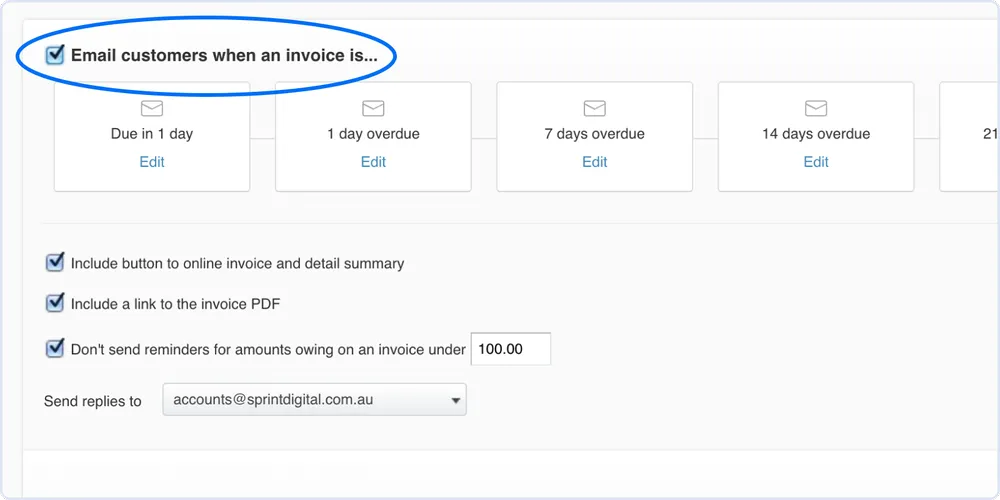
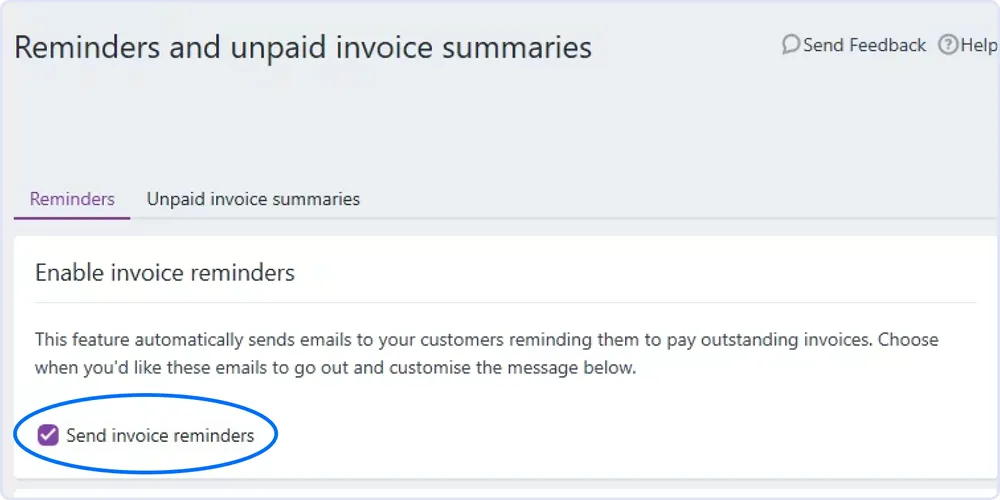
Section titled “3. Turn OFF invoice reminders in Xero or MYOB”If you’re connected to an accounting system, disable its own reminders so your customers don’t get chased twice. Sawfish becomes the single source of reminders.
Xero - in your invoice reminder settings, untick “Email customers when an invoice is…”:
MYOB - open Reminders and unpaid invoice summaries and turn off Send invoice reminders:
4. Raise and approve invoices anywhere - but send from Sawfish
Section titled “4. Raise and approve invoices anywhere - but send from Sawfish”You can create invoices in Sawfish, Xero, or MYOB - they synchronise automatically.
Head to your dashboard - you’re ready to invoice.